Wedding RSVP Tracker for Multiple Events (Free Template)
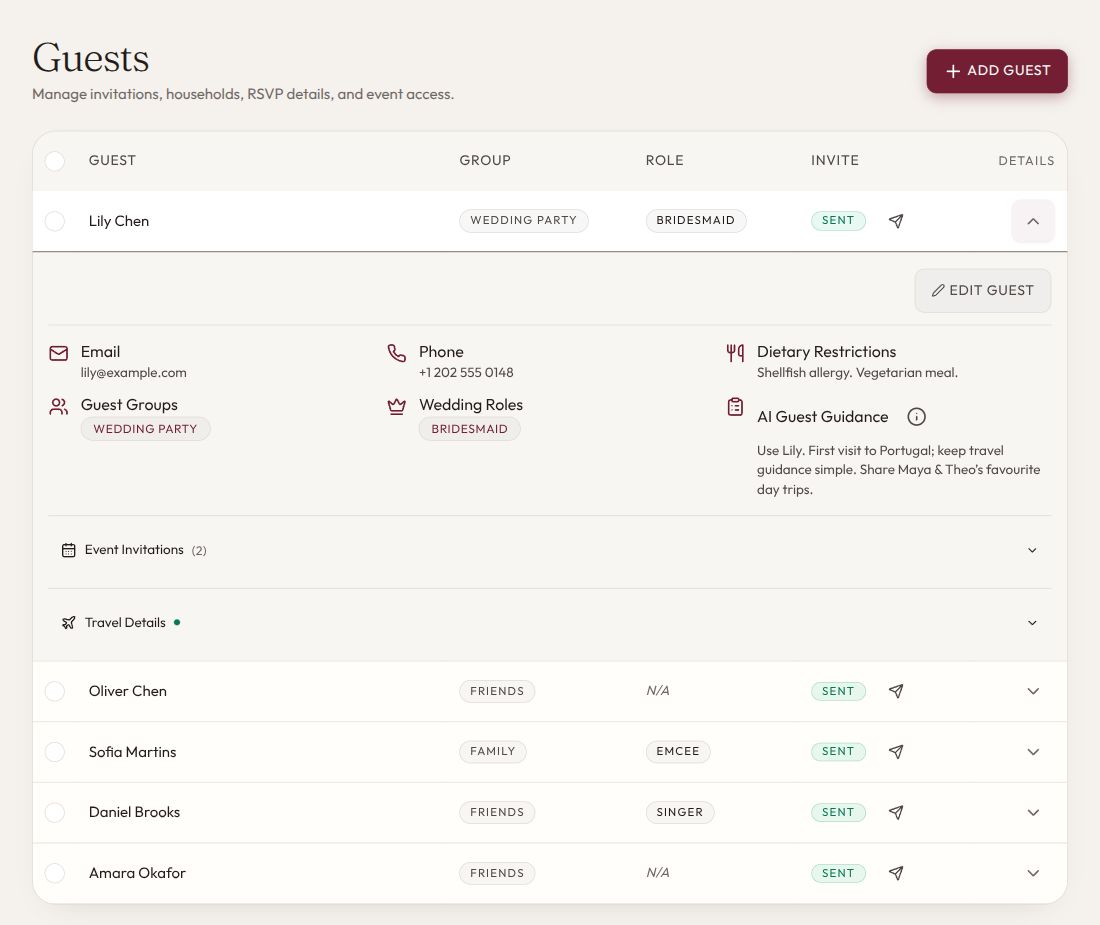
For a wedding with several events, track each person's invitation and reply separately for each event. Keep one guest list, group people by household for communication, and build catering and transport counts from the relevant event responses.
A single “attending the wedding” column won't tell you who is coming to the Friday dinner, who needs a Saturday meal, or who has requested a return shuttle.
Start with the editable templates: people list, event responses, and instructions and reminder messages. Open the CSVs in your spreadsheet app and make your own copies. Their sample rows are fictional.
Use household contacts and individual people
A household is useful for sending one invitation or reminder. A person is the unit you count when planning attendance. Keep both concepts in the tracker.
For example, the Patel household may have two adults and one child. All three might be invited to the reception, while only the adults are invited to a separate dinner. One person may reply for the household, but the response must still identify each person's events.
Give each person a simple ID such as P001 and each household an ID such as H001. Names can change or repeat; the ID connects the rows. Store only the contact details you need, and restrict access to the people managing the list.
A guest group such as “travelling family” can help organize communication, but it must not quietly determine invitation permissions. Review the actual event invitations before sending.
Separate invitation, response and follow-up
Use three distinct fields:
| Field | Suggested values | Why it matters |
|---|---|---|
| Invitation | Invited / not invited | A person with no reply is different from someone who was never invited |
| Response | Pending / attending / declined / not applicable | Use not applicable only when the person is not invited to that event; invited people stay pending until they reply |
| Follow-up | Not needed / reminder due / contacted / exception | The guest lead knows what to do next |
Record when the reply was received and who supplied it. For a changed answer, save the previous answer and the correction in a change log instead of leaving someone to remember what happened.
Don't use an empty cell for several meanings. “Blank” can mean no reply, no invitation, an import error or somebody forgot to fill it in. Explicit values make the list easier to hand over.
Set the RSVP timeline from your actual commitments
Before choosing a reply date, list the deadlines that turn estimates into commitments. Separate an early hotel decision from a final meal choice if they happen months apart. An interest poll helps you plan; it does not book a room or become a final acceptance without a clear request to the guest.
This fictional calendar uses 18 July as the reply deadline:
| Date | What happens | Who acts |
|---|---|---|
| 18 July | Guests reply for their named events and requested journeys | Household contact |
| 19 to 20 July | Chase missing replies and clarify incomplete answers | Guest-list lead |
| 21 July | Reconcile nights, transport and attendance; escalate unresolved replies | Guest-list and travel leads |
| 22 July | Last agreed date to reduce the guaranteed hotel block | Hotel booking owner |
| 25 July | Transport numbers become binding under the example booking | Transport lead |
| 1 August | Caterer receives confirmed meals | Catering contact |
These dates are illustrative, not recommended lead times. If the hotel needed a decision before 18 July, this calendar would fail. Move the relevant guest request earlier or change the commitment with the hotel. A booking link still being open does not mean you can reduce a guarantee without cost.
Before sending invitations, check that guests have enough information to answer: exact invited dates, locations, required nights, covered costs and their own booking tasks. Put the response deadline and the contact for later changes beside the response method.
Collect the details you will actually use
For an attending guest, you may need a meal choice, dietary request, accessibility conversation, or transport response. Ask clearly, explain who handles the information, and keep sensitive details out of broadly shared supplier sheets.
Separate requests from confirmed arrangements. “Needs step-free transport” should create a private follow-up with the transport organizer. It is not proof that a suitable vehicle is booked. Likewise, the caterer needs to confirm how they will handle a dietary request; a completed form alone doesn't establish the arrangement.
Avoid treating an optional unanswered travel question as a declined invitation. Resolve the missing operational detail while preserving the guest's attendance response.
Test invitations and meal handovers before sending
Create sample invitations for a guest attending everything, a reception-only guest, and a household whose members have different invitations. Open each as the recipient would. Check the visible events, RSVP choices and reminder wording. If your website cannot restrict a smaller event, send its details privately rather than placing it on the public itinerary.
For meals, connect the request to a named person and event, then record the caterer's answer. Ask who checks the meal before service and how that person finds the diner. If the caterer needs more information, arrange a private conversation with the guest; avoid interpreting a vague allergy note yourself. Update the serving reference if the seating plan changes. A label such as "vegan" does not answer an allergy question.
You can use this request:
Please confirm the arrangement for [guest] at [event], who will handle the meal at service, and which questions need the guest's direct input. We will send the final seating reference by [date].
Keep those details in a restricted catering view. The MC, general helpers and other guests do not need the dietary list.
Reconcile counts with a worked example
Imagine these four fictional people:
| Guest | Friday dinner | Saturday reception | Saturday shuttle |
|---|---|---|---|
| P001 Maya | Attending | Attending | Requested |
| P002 Leo | Declined | Attending | Own transport |
| P003 Robin | Not invited | Attending | Requested |
| P004 Casey | Pending | Pending | Unknown |
The Friday dinner has one confirmed attendee and one pending invited guest. The reception has three confirmed attendees and one pending guest. There are two confirmed attendees requesting the Saturday shuttle, which the transport lead still needs to allocate and confirm.
Do not count Casey as attending, silently count Casey as declined, or add Casey to a vehicle without resolving the question. Keep pending responses visible when discussing final deadlines with the relevant suppliers.
If children or supplier meals have different catering arrangements, record those categories explicitly and confirm the counting rules with the caterer. Do not guess from age labels or subtract them from the person count without agreement.
Handle plus-ones and changed replies deliberately
Record a plus-one allowance separately from a named attendee. When the identity is known, create or confirm the person record and the events they are invited to. Otherwise, a placeholder and a newly added name can accidentally count as two people.
For children, specify the invitation by name or clear household scope. A household reply should not require the guest to infer whether every child is included in every event.
When a reply changes after a deadline, acknowledge it and check which arrangements can still change. Update the response, contact affected suppliers, and record their confirmation. Tell the guest when the revised arrangements are confirmed instead of promising an immediate change you haven't checked.
If Leo in the example cancels Saturday, the reception becomes two confirmed attendees plus Casey's pending reply. The two shuttle requests stay unchanged because Leo had selected his own transport. Update the meal and seating records, ask the caterer whether the billed count can change, and check any host-arranged services separately.
Keep attendance and billed meals as different figures if the guarantee has passed. Ask Leo to cancel any room he booked himself; do not assume removing him from your list does it. The instructions pack includes a cancellation checklist for each affected service.
Use reminders that make replying easy
A first reminder can be brief:
Hi [name], we're confirming numbers for [event/date]. Could you reply for [named guests] by [deadline] using [method]? Your invitation lists the events for each person. If you're unsure or need help with the response, message [contact]. We'd appreciate an update either way.
For an incomplete reply, ask for only the missing item. “Thank you. We have you attending Saturday. Could you confirm whether you need the hotel shuttle by Thursday?” is easier to answer than sending the entire form again.
Before handing over the list, check duplicate people, impossible states such as “not invited + attending,” unresolved replies, and the date each supplier received its count. Give the guest lead the pending replies and the supplier contacts needed to resolve them.
Once your counts are final, the next job is the room. See how to plan your reception floor plan and seating chart.
How aiDo keeps your RSVPs for every event in one place
aiDo is built for weddings with more than one event. You keep one guest list, and every guest has their own invitations, replies, dietary needs and notes.

Invite each guest to the right events. Add guests yourself, or upload your spreadsheet and review what aiDo imports. Then invite each person only to the events they're coming to: the welcome dinner, the ceremony, the reception, the brunch.
Guests reply for each event. Every guest gets a personal invitation link. It shows only the events they're invited to, and they answer yes or no for each one. You never have to work out whether "yes" meant the whole weekend.
See your counts for every event. Each event shows how many guests are confirmed, pending and declined. Or just ask aiDo: "Who still hasn't replied to the welcome dinner?"
Remind only the guests who haven't replied. Ask aiDo to remind everyone who hasn't replied to an event. It writes the email or app message for exactly those guests, and nothing is sent until you confirm it.
Frequently asked questions
How do you track RSVPs for multiple wedding events? Keep one guest list, and record a separate invitation and reply for each person at each event. Count attendance per event, not per wedding.
When should the RSVP deadline be? Work backwards from your earliest binding commitment, such as a hotel block, transport booking or final catering count. Set the reply date early enough to chase missing answers before that deadline.
How should I count guests who haven't replied? Keep them as pending. Don't count them as attending or declined until they answer, and tell your suppliers how many replies are still open.
What should an RSVP reminder say? Name the guests and events, give the deadline and the way to reply, and offer a contact for questions. Keep it short and friendly.